
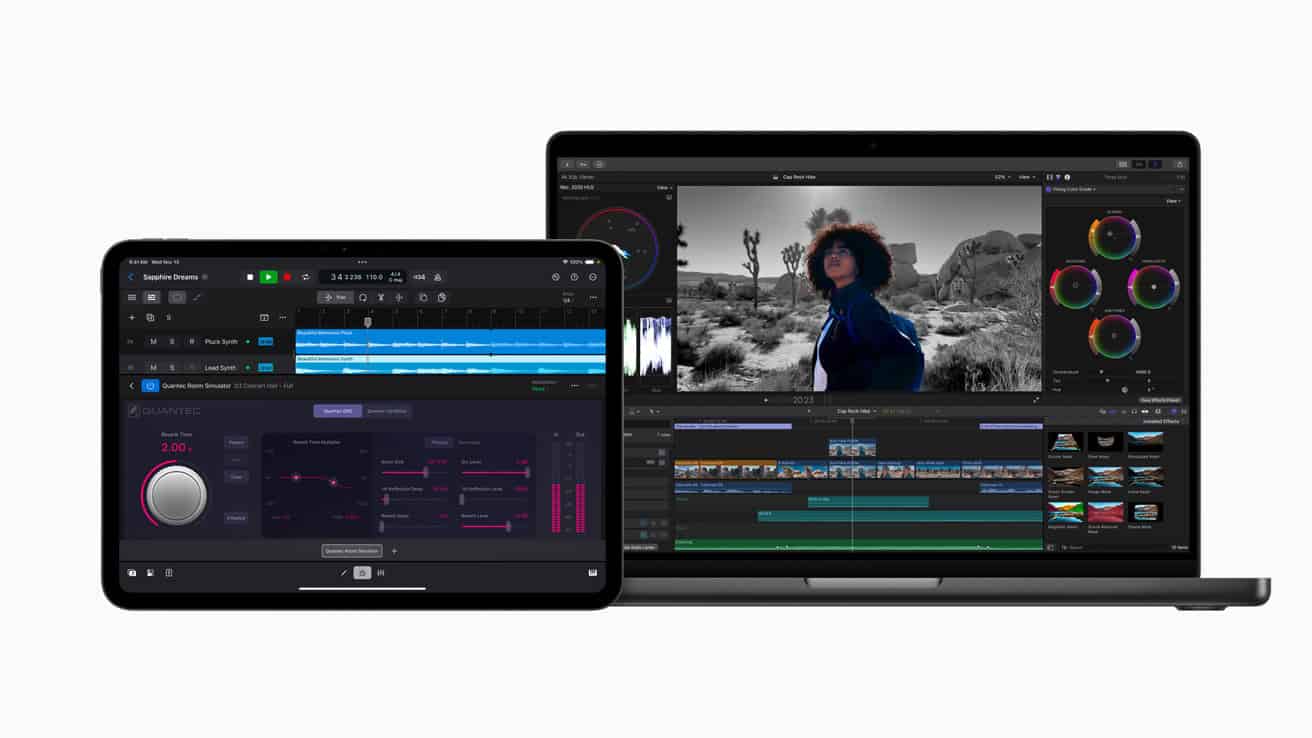
Wondering about the price of Final Cut Pro? Apple’s professional video editing software has a clear cost structure that might surprise you. Final Cut Pro costs a one-time fee of $299.99 with no subscription required. Once you buy it, you own it and get all future updates for free.
Many video editors appreciate this straightforward pricing compared to subscription-based alternatives. If you’re a student or educator, you can get an even better deal with the Pro Apps Bundle for Education at just $199, which includes Final Cut Pro and other professional Apple apps. Not sure if it’s right for you? Apple offers a 90-day free trial so you can test the software before buying.
The software is available through the Mac App Store and can be installed on multiple Macs with your Apple ID. With tools for 360° video editing, 4K HDR support, and advanced color correction, Final Cut Pro offers professional features that make the one-time purchase worthwhile for many video creators.
Final Cut Pro: 2026 Guide
Everything You Need to Know to Edit Faster, Smarter, and More Professionally
Final Cut Pro remains one of the most powerful and efficient video editing platforms for macOS. In 2026, Apple continues to refine its ecosystem with performance upgrades, AI‑assisted tools, and tighter integration across Mac, iPad, and iPhone.
This guide walks you through Final Cut Pro in 2026—from new features and workflow tips to hardware recommendations and best practices for beginners and professionals alike.
What’s New in Final Cut Pro (2026)
Apple’s focus in 2026 is speed, automation, and cross‑device editing.
Key Updates You’ll Notice
- AI‑Assisted Editing Tools
- Automatic highlight detection
- Smarter scene cuts
- Enhanced voice isolation and noise reduction
- Improved Performance on Apple Silicon
- Faster timeline scrubbing
- Real‑time playback of 8K ProRes
- Better thermal and battery efficiency on MacBooks
- Cloud & Device Integration
- Seamless project handoff between Mac and iPad
- iPhone footage auto‑sync and color matching
- Enhanced Object Tracking
- More accurate masks
- Faster tracking for titles, effects, and color grading
Getting Started with Final Cut Pro
System Requirements (2026)
- macOS (latest version recommended)
- Apple Silicon Mac (M1 or newer strongly recommended)
- Minimum 16GB RAM for professional workflows
- Metal‑capable GPU
First‑Time Setup Tips
- Enable Background Rendering
- Set media storage to an external SSD
- Customize keyboard shortcuts early
- Enable automatic backups
Understanding the Final Cut Pro Interface
Key Sections
- Browser – Organize and preview clips
- Timeline – Magnetic, trackless editing
- Inspector – Clip settings, color, effects
- Effects & Transitions – Built‑in and third‑party tools
Magnetic Timeline (Why It Still Matters)
Final Cut Pro’s magnetic timeline prevents accidental gaps and sync errors, making it ideal for:
- Fast turnarounds
- Social media content
- Documentary editing
- YouTube creators
Importing & Organizing Media Like a Pro
Best Practices
- Use Libraries → Events → Projects properly
- Create keyword collections for fast searching
- Apply roles (dialogue, music, effects)
- Use smart collections to automate organization
Supported Formats (2026)
- ProRes, ProRes RAW
- H.264 / H.265 (HEVC)
- RED, Sony, Canon, Blackmagic RAW
- iPhone Log and HDR footage
Editing Workflow in 2026
Faster Cutting Techniques
- Use Range Selection (R) for precise edits
- Leverage Auditions to compare takes
- Use Compound Clips to clean timelines
- Enable Skimming for rapid previewing
AI‑Powered Tools
- Auto‑cut interviews
- Detect silence and filler words
- Smart reframing for vertical video
- Scene detection for long clips
Color Grading & HDR
Built‑In Color Tools
- Color Wheels
- Color Curves
- Hue/Saturation Curves
- LUT support (including iPhone Log LUTs)
HDR Editing
- Native HDR workflows
- Dolby Vision support
- Wide color gamut monitoring
- Automatic SDR conversions for web
Audio Editing & Mixing
Audio Tools
- Voice isolation
- Noise removal
- Multichannel audio editing
- Roles‑based audio mixing
Best Audio Tips
- Use roles for dialogue, music, effects
- Normalize dialogue early
- Avoid clipping during export
- Monitor with headphones
Effects, Titles & Motion Integration
Motion + Final Cut Pro
- Create custom titles and effects
- Design lower thirds
- Build reusable templates
Third‑Party Plugins (Popular in 2026)
- MotionVFX
- Pixel Film Studios
- FXFactory
- FilmConvert
Exporting & Sharing
Export Presets
- YouTube & YouTube Shorts
- Instagram Reels
- TikTok
- Apple ProRes Masters
- Broadcast‑ready files
Export Tips
- Use HEVC for web delivery
- ProRes for archiving
- Match frame rate and color space
- Always preview before publishing
Hardware Recommendations (2026)
Best Macs for Final Cut Pro
- MacBook Pro (M3 / M4) – Mobile professionals
- Mac Studio – Editors and colorists
- Mac Pro – High‑end production workflows
Essential Accessories
- External NVMe SSDs
- Color‑accurate monitors
- Control surfaces (Loupedeck)
- Backup storage solutions
Common Problems & Fixes
Timeline Lag
- Disable background rendering
- Use proxy media
- Reduce timeline resolution
Crashes
- Update macOS and FCP
- Check plugin compatibility
- Delete generated files
Export Errors
- Clear render files
- Export in sections
- Check storage space
Final Cut Pro vs Other Editors (2026)
| Feature | Final Cut Pro | Premiere Pro | DaVinci Resolve |
|---|---|---|---|
| Performance | ✅ Excellent | ⚠️ Variable | ✅ Excellent |
| Pricing | One‑time | Subscription | Free + Paid |
| Learning Curve | Easy‑Medium | Medium | Medium‑Hard |
| Apple Integration | ✅ Best | ❌ | ⚠️ |
Is Final Cut Pro Worth It in 2026?
Yes—especially if you’re in the Apple ecosystem.
Final Cut Pro in 2026 is:
- Fast
- Stable
- AI‑enhanced
- Optimized for Apple Silicon
- Ideal for creators, filmmakers, and professionals
If you value performance and a one‑time purchase over subscriptions, Final Cut Pro remains a top‑tier editing solution.
Key Takeaways
- Final Cut Pro has a one-time cost of $299.99 with no subscription fees or hidden charges.
- Students and educators can save money with the Pro Apps Bundle for Education priced at $199.
- A free 90-day trial lets users test all features before making a purchase decision.
Final Cut Pro Overview
Final Cut Pro stands as Apple’s professional video editing software that combines powerful features with a user-friendly interface. It offers a complete toolkit for video editors at a one-time purchase price rather than a subscription model.
What Is Final Cut Pro?
Final Cut Pro is Apple’s professional-grade video editing software designed exclusively for Mac users. Originally released as Final Cut Pro X (FCPX), it has evolved into a comprehensive post-production solution for filmmakers, content creators, and video professionals.
Unlike many competitors, Final Cut Pro uses a one-time payment model. Users can purchase the full software for $299.99, with no recurring fees. This price gives you complete access to all features and future updates.
Students and educators can benefit from special pricing through the Pro Apps Bundle for Education at $199, which includes Final Cut Pro and other professional Apple software.
The software provides a magnetic timeline that helps editors work more efficiently by automatically organizing clips and preventing accidental overlaps.
Key Features and Tools
Final Cut Pro offers an impressive array of editing tools that handle complex projects with ease. The software supports editing in multiple formats including 4K, 8K, and HDR, making it future-proof for high-resolution projects.
Its revolutionary post-production capabilities include 360° video editing and advanced motion graphics creation. The color correction tools allow for precise adjustments to make your footage look professional.
Final Cut Pro excels with:
- Multicam editing for syncing up to 64 camera angles
- Advanced color grading with built-in presets
- Video stabilization to smooth shaky footage
- Motion graphics templates for quick titles and effects
- Powerful audio editing tools
The software’s rendering speeds are exceptionally fast, especially on Apple Silicon Macs. This performance boost lets editors work with effects and transitions in real-time without waiting for previews to render.
Apple Ecosystem Integration
Final Cut Pro seamlessly integrates with Apple’s hardware and software ecosystem, creating a smooth workflow for creators. The software is optimized for Mac computers, particularly those with Apple Silicon chips, delivering remarkable performance gains.
Apple has expanded Final Cut Pro to iPad, bringing professional editing capabilities to the tablet format. This mobile version maintains core features while adapting to touch controls.
The software works perfectly with other Apple pro applications:
- Compressor for advanced media encoding
- Motion for sophisticated animation and effects
- Logic Pro for professional audio production
Files move effortlessly between these programs, allowing editors to enhance projects without leaving the Apple environment. Projects can be started on iPad and finished on Mac, providing flexibility for editors on the go.
Final Cut Pro’s deep integration with macOS means better performance and stability compared to cross-platform alternatives, making full use of Apple hardware advantages.
Acquiring Final Cut Pro
Final Cut Pro is available through several purchasing routes with different price points. Buyers need to consider both the upfront cost and the value they’ll get from this professional video editing software.
Purchasing Options
Apple sells Final Cut Pro on the Mac App Store for $299.99 as a one-time purchase. This gives you the full version with no subscription fees.
You can install it on multiple Macs with the same Apple ID. The software comes with free updates, which arrive automatically through the App Store.
For students and educators, Apple offers a better deal. The Pro Apps Bundle for Education costs only $199 and includes Final Cut Pro plus other professional apps.
Before buying, try the free trial. Apple provides a 90-day trial period with full features so you can test it thoroughly.
Cost Considerations
The $299.99 price tag might seem high at first glance. However, it’s a one-time payment rather than a subscription model like many competitors use.
This means no monthly fees or annual renewals. Once you buy it, you own it forever, including all future updates.
When weighing the cost, consider the powerful features Final Cut Pro provides:
- 360° video editing capabilities
- Advanced motion graphics
- 4K HDR support
- Professional color correction tools
- AI-powered features for faster editing
For professional video editors, the software often pays for itself through time saved and improved results. Students should definitely look at the education bundle to save $100 while getting additional professional apps.
The lack of a monthly payment option may disappoint some users who prefer lower upfront costs. But the long-term value makes it worth considering for serious video work.
System Requirements
Before diving into Final Cut Pro’s costs, understanding what hardware you’ll need is crucial. Apple sets specific requirements for both Mac computers and now iPads to ensure smooth video editing performance.
Compatible Devices
Final Cut Pro works on both Intel-based Macs and Apple Silicon models. For Mac users, you’ll need a computer with a Metal-capable graphics card if using an Intel-based machine. This ensures proper handling of video processing tasks.
Apple recommends at least 8GB of RAM, though 16GB is better for serious editing work. If you plan to edit 4K videos, 3D titles, or 360° video, you should have at least 1GB of VRAM.
Storage requirements are substantial. The software itself needs about 6.5GB of space for installation. However, video editing projects demand much more. Many professionals recommend 2-4TB of storage space for your video files.
Operating System Compatibility
Final Cut Pro requires macOS 14.6 or later on Mac computers. Apple regularly updates these requirements with new software releases.
The exciting news is that Final Cut Pro is now available on iPadOS as well. This version works on iPad models with the M1 chip or newer, giving editors more flexibility.
Installation requirements include 3.8GB for Final Cut Pro, 4.75GB for Motion, and 1.2GB for Compressor if you’re installing the complete suite. These are just the program files – your actual projects will need much more space.
For optimal performance, connecting external storage via Thunderbolt or USB-C is recommended. This helps manage large video libraries without filling internal storage.
Extensions and Add-Ons
Final Cut Pro’s capabilities expand significantly through its ecosystem of extensions and add-ons. These enhance editing workflows and add creative possibilities beyond the core software’s functionality.
Plug-Ins and Effects
Final Cut Pro supports a wide range of professional plugins and effects that boost productivity and creative options. Companies like MotionVFX and Pixel Film Studios offer specialized tools that integrate seamlessly with the software.
Many plugins focus on specific needs like color grading, motion tracking, and transitions. The FCPX Tracker Suite ($299.75) provides advanced tracking capabilities, while other options include timer effects and specialized transitions.
Some plugins are available for free, such as zoom transition packs and image shift effects. These make good starting points for editors on tight budgets.
FxFactory offers a comprehensive marketplace for Final Cut Pro plugins, with options ranging from $129 for specific tools to $399 for complete visual effects packages.
Complementary Apps
Apple offers several companion applications that work with Final Cut Pro to enhance post-production workflows:
Motion ($49.99) – Allows creators to design custom motion graphics, titles, and transitions that integrate directly with Final Cut Pro projects. Motion templates can be saved and reused across multiple projects.
Compressor ($49.99) – Handles advanced media encoding and delivery options beyond Final Cut Pro’s built-in export features. It supports batch processing and custom output settings for various platforms.
Logic Pro ($199.99) – While primarily a music production application, Logic Pro pairs well with Final Cut Pro for advanced audio editing needs and soundtrack creation.
These apps share similar interfaces and file compatibility, making them natural extensions of the Final Cut Pro ecosystem.
Final Cut Pro for iPad
Apple offers Final Cut Pro for iPad as a subscription-based video editing app. This mobile version brings professional editing tools to the iPad with touch-friendly controls and some unique features, though it has certain limitations compared to its Mac counterpart.
Exploring Final Cut Pro on iPad
Final Cut Pro for iPad costs $4.99 per month or $49 per year, making it Apple’s first subscription app. This pricing model differs from the Mac version, which requires a one-time payment of around $300.
Many Mac users feel frustrated that they need to pay an additional subscription fee to use the app on their iPads even if they already purchased the desktop version.
The app works best on newer iPad models with more storage. The ideal setup includes an iPad Pro, Apple Pencil, and external storage, which can total nearly $2,400 without accessories.
Final Cut Pro for iPad includes Camera Mode, which lets users record and edit directly on their device. This feature works nicely with the Apple Pencil for precise editing tasks.
iPad Version Capabilities
The iPad version offers several powerful tools but has artificial limitations compared to its desktop counterpart. It includes professional features like multicam editing and voice isolation.
Users can organize clips, trim videos, and apply color matching between shots. The touch interface makes some editing tasks more intuitive than using a mouse and keyboard.
However, the iPad version lacks certain export options and advanced features found in the Mac version. This makes it better suited for quick edits and mobile workflows rather than complete professional projects.
Storage becomes a major concern when editing video on iPad. Apple recommends purchasing a model with larger storage capacity since video files consume significant space.
Despite limitations, Final Cut Pro for iPad works well for content creators who need to edit on the go without carrying a laptop.
Workflow and Integration
Final Cut Pro offers a robust workflow system that helps editors manage projects efficiently. Its integration features connect with other software and facilitate team collaboration, making it a versatile choice for video professionals.
Project Management
Final Cut Pro uses a magnetic timeline that makes organizing clips quick and intuitive. Users can create and save project templates to speed up their workflow for similar video types.
Projects are stored in libraries, which can be placed on external drives for easy transport between workstations. This library system keeps all media, effects, and edits in one organized package.
Final Cut Pro’s first-class integration features let editors work with media smoothly. The software includes smart color management tools that maintain consistent looks throughout projects.
For large productions, editors can use roles to tag and organize different media types like dialogue, music, and effects. This makes mixing and finalizing videos much faster.
Collaborative Editing
Teams can share projects through several methods in Final Cut Pro. The software supports XML exports that help editors exchange work with team members.
Content can be stored on network drives, allowing multiple editors to access footage. While not as robust as some competitors, Final Cut Pro lets teams divide work effectively.
Editors can create proxy media (smaller file versions) to work remotely on less powerful machines. When ready to finish, the system automatically links back to high-quality source files.
The program includes easy ways to mark clips and add notes for other team members. This feedback system helps directors and producers communicate changes clearly.
Interoperability With Other Software
Final Cut Pro works well with other Apple programs like Motion and Compressor. These add extra features for animations and specialized output formats.
The software can import and export many file types, making it compatible with Premiere Pro projects through XML files. This helps when switching between editing platforms.
Final Cut Pro connects with audio programs like Pro Tools through AAF exports. This workflow lets sound designers refine audio after the video edit is complete.
For graphics work, the program integrates with Photoshop, allowing editors to import layered files and make adjustments directly in Final Cut Pro.
Third-party plugins expand Final Cut Pro’s capabilities with special effects and tools. These add-ons let editors customize their workflow with specific features not found in the base program.
Enhancements and Updates
Final Cut Pro continues to evolve with free updates for existing users while adding powerful tools for video creators. Apple has maintained a consistent update schedule, bringing new features that leverage both AI and improved graphics capabilities.
Recent Updates
Final Cut Pro 10.7 was released as a free update for existing users in late 2023. This update introduced several new tools for video editors, including enhanced AI-powered features.
The software now offers better motion tracking and automatic object detection. These smart tools help editors save time on tedious tasks that once took hours to complete.
Apple added improved graphics rendering in recent updates, allowing for smoother playback of complex projects. The color grading tools also received upgrades, giving editors more control over the final look of their videos.
For iPad users, Final Cut Pro now includes more pro-level features, though the iPad version requires a monthly subscription of $4.99 rather than a one-time purchase.
Future of Video Editing Software
The future of Final Cut Pro looks promising as Apple continues its pattern of providing free major revisions to existing customers. This stands in contrast to some competitors that charge for major version upgrades.
AI tools will likely play an even bigger role in upcoming versions. Features like automatic scene detection, content-aware editing, and smart audio mixing are expected to become more advanced.
Graphics capabilities will continue to improve, with better support for HDR workflows and 8K video editing. These enhancements will help creators deliver higher quality content for modern displays.
Cloud integration may expand in future updates, allowing for better collaboration between team members working on the same project from different locations.
Apple may also strengthen the connection between Mac and iPad versions, creating a more seamless workflow for editors who use both platforms.
Creative Techniques
Final Cut Pro offers powerful tools that enable editors to bring their creative vision to life. These features help transform raw footage into compelling stories with professional-quality sound.
Visual Storytelling
Final Cut Pro provides numerous visual effects options that can enhance your storytelling. The software includes tools for adjusting contrast and color grading that make scenes pop with visual impact.
When creating slow-motion footage, Final Cut Pro’s smooth slo-mo capabilities produce fluid results without the choppy look of lower-quality effects. This works especially well for dramatic moments or action sequences.
Editors can switch between different camera modes to create unique looks. For example, using the overhead view for instructional videos and close-ups for emotional impact helps vary the visual experience.
The software includes over 8,000 premium elements and transitions that can be added to projects. These elements help create professional-looking videos without needing to design effects from scratch.
Audio Editing and Soundtracks
Audio quality can make or break a video project. Final Cut Pro includes advanced audio editing tools that help create a professional sound experience.
The voice isolation feature removes background noise automatically, making dialogue clearer without complex editing. This saves time and improves quality in interview footage or narrative pieces.
Adding soundtracks is simple with Final Cut Pro’s built-in music library. Editors can also import custom audio and sync it perfectly with visual elements.
Sound effects can be layered and timed precisely to match on-screen action. The multi-track audio editing allows for complex sound design with different volume levels for dialogue, music, and effects.
Final Cut Pro’s audio tools include equalizers and filters that help balance sound levels. This creates a professional audio mix that enhances the viewer’s experience rather than distracting from the content.
Frequently Asked Questions
Final Cut Pro pricing comes with several options and special conditions that can affect what you’ll pay. These common questions cover the most important details about costs, licenses, and ways to save money.
What is the cost of Final Cut Pro for students?
Students and educators can purchase Final Cut Pro at a special educational discount. The education bundle includes Final Cut Pro and other professional apps at a significantly reduced price compared to the standard cost.
Students must verify their enrollment at a qualifying educational institution to access this special pricing. The educational discount makes professional video editing software more affordable for those learning film production.
Does Final Cut Pro offer a monthly subscription fee?
No, Final Cut Pro does not currently offer a monthly subscription option. Unlike some competing video editing software, Apple has maintained a one-time purchase model for Final Cut Pro.
This means users don’t need to worry about recurring fees to keep using the software. Once purchased, you own the license to use that version permanently.
Is there a one-time purchase option for Final Cut Pro?
Yes, Final Cut Pro is only available as a one-time purchase for $299. This single payment gives you full access to the software without any additional costs.
After buying it, you’ll receive free updates for that version. The software is sold exclusively through the Apple App Store.
How does the price of Final Cut Pro compare to Adobe Premiere Pro?
Final Cut Pro costs $299 as a one-time purchase, while Adobe Premiere Pro requires a monthly subscription as part of Creative Cloud. Over time, Final Cut Pro becomes more cost-effective than Premiere Pro.
The subscription fees for Premiere Pro add up each year, eventually exceeding Final Cut Pro’s single payment. For long-term users, this price difference can be substantial.
Can Final Cut Pro be purchased with a perpetual license?
Yes, when you buy Final Cut Pro, you receive a perpetual license. This means you can use the software forever without additional payments.
The license allows you to install Final Cut Pro on multiple computers you own. However, you can only use it on one computer at a time according to Apple’s terms.
Are there any discounts available for Final Cut Pro?
Besides the education discount, Apple occasionally offers promotions on Final Cut Pro. These may include temporary price reductions or bundling with other professional apps.
Apple also provides a free 90-day trial of Final Cut Pro. This lets you test all features before deciding to purchase the full version.
Corporate or volume licenses might be available for businesses buying multiple copies. These bulk purchases may come with special pricing arrangements.





