Low power mode has become an essential feature for modern device users who need to extend their battery life. This power-saving option limits background processes and adjusts system settings to maximize battery duration during critical moments. When activated, low power mode reduces power consumption by automatically adjusting mail fetch, background app refresh, automatic downloads, and visual effects.
Mobile devices offer easy access to low power mode through quick settings or battery menus. Users can enable this feature manually at any time or set it to activate automatically when battery levels drop below certain thresholds. The mode remains active until the device is charged to an adequate level.
Power management options extend beyond mobile devices to Windows PCs, where users can select different power modes to balance performance and battery life. These modes give users control over their device’s energy consumption based on their immediate needs and priorities.
iPhone Low Power Mode Changes
Low Power Mode has been a popular feature on iPhones to extend battery life by reducing background activity and performance. In 2026, Apple has introduced several enhancements and changes to Low Power Mode to improve user experience and battery management.
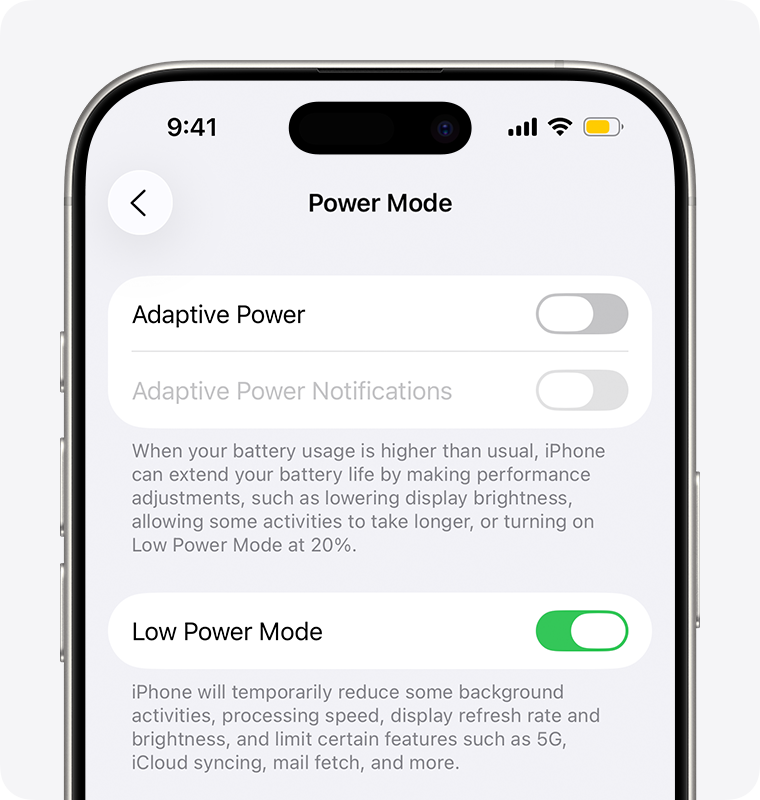
1. Adaptive Low Power Mode
- In 2025, Apple introduced Adaptive Low Power Mode, which intelligently adjusts power-saving measures based on your usage patterns.
- Instead of a fixed set of restrictions, the system dynamically balances performance and battery life.
- For example, it may allow higher performance during active use but reduce background activity more aggressively when idle.
2. Automatic Activation Based on Battery Health and Usage
- Low Power Mode can now automatically activate not only based on battery percentage but also considering your battery health and daily usage habits.
- This helps prolong overall battery lifespan by reducing strain during heavy use or when battery health is degraded.
3. More Granular Controls
- Users can now customize which features Low Power Mode affects.
- Options include toggling background app refresh, mail fetch frequency, visual effects, and CPU performance independently.
- This customization allows users to tailor battery saving to their priorities.
4. Integration with iOS 26’s Battery Widget
- The Battery widget in iOS 26 now provides real-time suggestions for enabling or disabling Low Power Mode based on current usage and estimated battery life.
- It also shows how much battery time you can save by turning it on.
5. Improved Notifications
- Instead of just a one-time prompt at 20% battery, iOS now sends smarter Low Power Mode reminders at customizable battery levels.
- You can also schedule Low Power Mode to turn on automatically during certain times (e.g., overnight or during work hours).
6. Compatibility
- Adaptive Low Power Mode is available on iPhone 12 and later models running iOS 26 or newer.
- Older devices continue to use the traditional Low Power Mode.
Summary Table
| Feature | Description | Availability |
|---|---|---|
| Adaptive Low Power Mode | Dynamic power saving based on usage | iPhone 12+ with iOS 26+ |
| Automatic Activation | Activates based on battery % & health | iPhone 12+ with iOS 26+ |
| Granular Controls | Customize Low Power Mode effects | iOS 26+ |
| Battery Widget Integration | Real-time suggestions and battery savings info | iOS 26+ |
| Improved Notifications | Smarter, customizable reminders | iOS 26+ |
How to Use New Low Power Mode Features
- Go to Settings > Battery > Low Power Mode to enable or customize settings.
- Add the Battery widget to your Home Screen or Today View for quick access and suggestions.
- Use Shortcuts app to automate Low Power Mode based on time or location.
Key Takeaways
- Low power mode extends battery life by reducing system processes and features
- Users can activate power-saving features manually or set automatic triggers
- Different devices offer customizable power management settings to match user needs
Understanding Low Power Mode
Low Power Mode reduces device energy consumption by adjusting system settings and limiting background processes to extend battery life.
Concept and Benefits
Low Power Mode preserves battery life by modifying key system behaviors. It dims screen brightness, disables automatic email fetch, and pauses background app refresh. These adjustments can extend battery life by 2-3 hours.
Network speeds slow down to conserve power, and visual effects are minimized. The battery icon turns yellow to indicate Low Power Mode is active.
A device in Low Power Mode operates with reduced performance to save energy. This means slower processor speeds and delayed notifications for non-essential tasks.
Implementation in Operating Systems
Modern operating systems include built-in power-saving features. iOS users can enable Low Power Mode through Settings > Battery or via Control Center with a quick tap of the battery icon.
Android’s Battery Saver mode functions similarly, accessible through quick settings or battery menu. The feature activates automatically at user-defined battery percentages.
Windows power options provide multiple energy-saving profiles. Users select between Balanced, Power Saver, and High Performance modes through the Control Panel or Settings app.
macOS implements power management through System Settings > Battery. It offers options to reduce display brightness and pause background processes when battery levels drop.
Frequently Asked Questions
Low Power Mode enables users to extend battery life by reducing certain system functions and background activities. Many device settings can be customized to maximize power savings.
Is it acceptable to use Low Power Mode on the iPhone consistently?
Using Low Power Mode continuously will not damage the iPhone. The feature reduces performance to conserve battery life.
Battery health remains unaffected by extended Low Power Mode usage. Users who prioritize battery longevity over performance can safely leave it enabled.
How can Low Power Mode be activated automatically on an iPhone?
Users can set up automation in Shortcuts to enable Low Power Mode at specific battery percentages. The feature can also activate when the battery drops to 20%.
iOS allows scheduling Low Power Mode through Screen Time limits and Focus modes. These automated options help maintain consistent battery management.
What alterations occur on an iPhone when Low Power Mode is enabled?
Mail fetch, background app refresh, and automatic downloads pause. The screen dims after 30 seconds of inactivity.
5G switches to 4G/LTE unless 5G is needed. Visual effects and animations reduce to minimize power consumption.
Which functions are turned off when Low Power Mode is active?
iCloud Photos sync pauses temporarily. Automatic app updates stop until Low Power Mode is disabled.
“Hey Siri” voice activation becomes unavailable. Display refresh rates decrease to 60Hz on ProMotion devices.
Can you still receive text messages while in Low Power Mode?
Text messages arrive normally in Low Power Mode. Push notifications continue to function without interruption.
Message delivery remains instant and reliable. Group chats and iMessage features work as expected.
Is there a way to use Low Power Mode on an Apple Watch?
Apple Watch includes a Power Reserve mode for extended battery life. Users can activate it through Control Center or when the battery is critically low.
Power Reserve limits the watch to time display only. Normal functions resume after charging to adequate power levels.