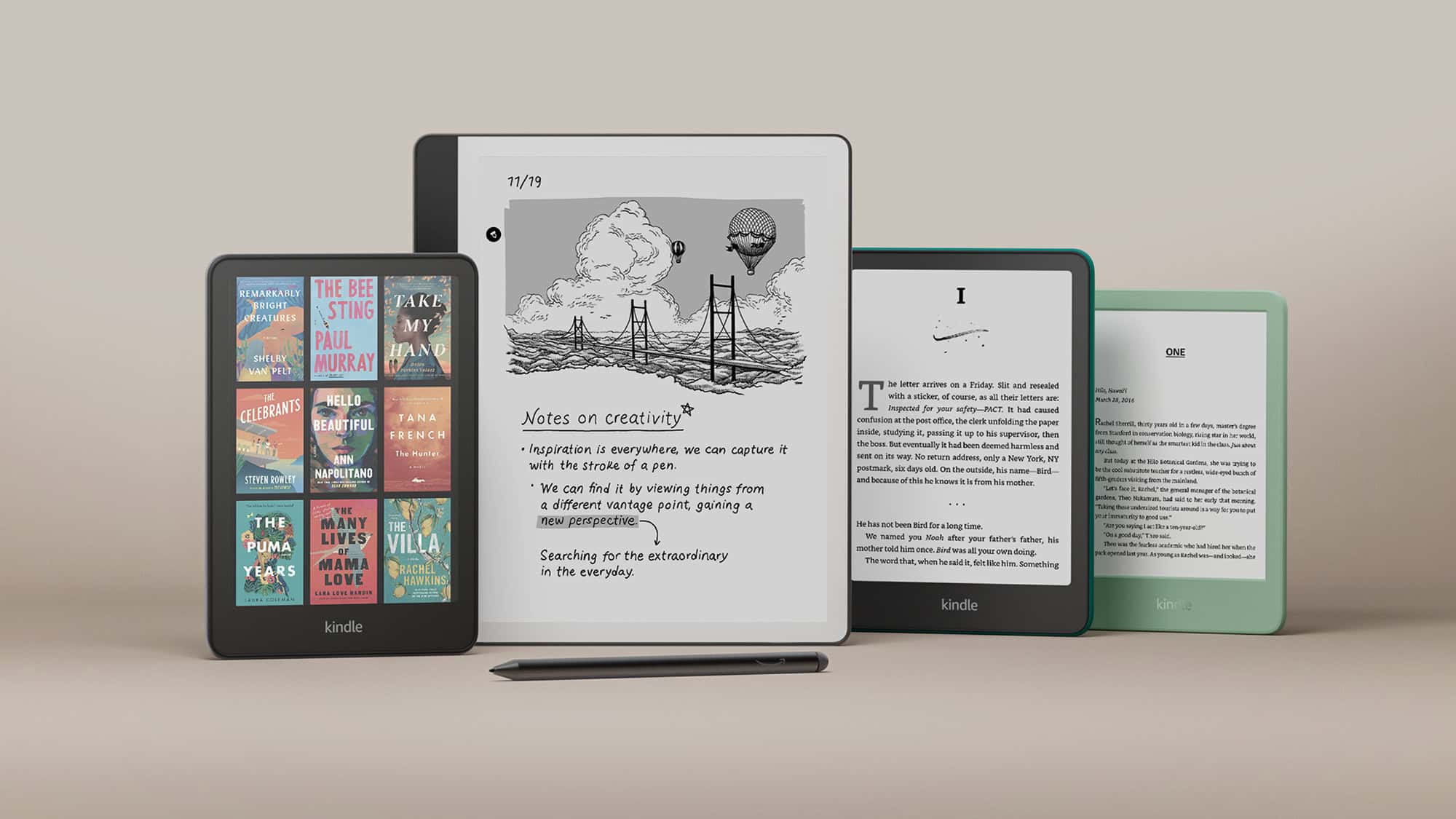
Amazon’s Kindle Scribe 2 builds on the original Scribe’s large-screen reading and writing experience, refining the hardware and expanding its note‑taking capabilities. Designed for readers who also want a distraction‑free digital notebook, the Scribe 2 blends Kindle’s best e‑ink display with improved pen features and smarter organization tools.
Here’s everything you need to know about the Kindle Scribe 2 in 2026.
What Is the Kindle Scribe 2?
The Kindle Scribe 2 is Amazon’s large-format Kindle with stylus support. It combines:
- A large e‑ink display for comfortable reading
- A paper‑like writing experience
- Built‑in notebooks and PDF markup
- Weeks‑long battery life
It’s ideal for students, professionals, and avid readers who want one device for books and handwritten notes.
Key Features
📖 10.2–10.3” Paperwhite E‑Ink Display
- Glare‑free screen
- Adjustable warm light
- High resolution (300 ppi for text clarity)
- Improved contrast over the first-generation model
The display remains easy on the eyes, even in bright sunlight.
✍️ Upgraded Pen Experience
The Scribe 2 includes:
- Premium Pen with eraser
- Shortcut button for quick tools
- Lower latency writing
- Improved palm rejection
Writing feels closer to real paper, making it better suited for long note sessions.
🗂️ Enhanced Notebook Tools
Amazon has expanded its software features:
- Folder organization
- Multiple paper templates (lined, grid, checklist)
- Lasso selection tool
- Convert handwriting to text
- Direct note insertion into books (select titles)
These updates make the Scribe 2 more competitive with digital notebooks like reMarkable and Onyx Boox.
📄 PDF & Document Markup
You can:
- Import PDFs
- Write directly on documents
- Highlight and annotate
- Send documents wirelessly via Kindle app or email
This makes it useful for reviewing contracts, study materials, or manuscripts.
Battery Life
Like other Kindle devices, battery life is a major strength.
- Reading: Several weeks per charge
- Writing-heavy use: Around 1–3 weeks
- USB‑C charging
Actual battery life depends on brightness settings and writing frequency.
Storage Options
Typically available in:
- 16GB
- 32GB
- 64GB
For most users, 16GB is enough for books and notes. Larger storage is helpful if you store many PDFs.
How It Compares to the Original Kindle Scribe
| Feature | Kindle Scribe | Kindle Scribe 2 |
|---|---|---|
| Display | 10.2” | Slightly improved contrast |
| Writing Latency | Good | Faster |
| Notebook Tools | Basic | Expanded tools |
| Handwriting to Text | Limited | Improved |
| Organization | Minimal | Folder support |
The Scribe 2 refines the experience rather than reinventing it.
Kindle Scribe 2 vs iPad
| Feature | Kindle Scribe 2 | iPad |
|---|---|---|
| Display | E‑ink (no glare) | LCD/LED |
| Battery Life | Weeks | 1–2 days |
| Distractions | Minimal | Many apps |
| App Support | Limited | Full app ecosystem |
| Writing Feel | Paper‑like | Smooth glass |
Choose the Scribe 2 if you want focus and long battery life. Choose an iPad if you need apps, web browsing, and multimedia.
Who Is the Kindle Scribe 2 For?
✅ Avid readers who annotate books
✅ Students taking handwritten notes
✅ Professionals reviewing PDFs
✅ Writers brainstorming ideas
✅ Minimalists who prefer distraction-free tools
It’s not ideal for users who need:
- Third-party apps
- Web browsing
- Color display
- Multimedia features
Pros and Cons
✅ Pros
- Excellent e‑ink display
- Long battery life
- Improved note organization
- Comfortable writing experience
- Distraction-free design
❌ Cons
- Premium price
- Limited app ecosystem
- No color display
- Still evolving software features
Is the Kindle Scribe 2 Worth It?
If you primarily read books but want a built-in notebook, the Kindle Scribe 2 is one of the best large-screen e‑readers available.
However, if you need advanced productivity apps, cloud integration, or color markup, alternatives like an iPad or specialized e‑ink tablets may be better.
For focused reading and note‑taking in one device, the Scribe 2 strikes a strong balance.
Final Thoughts
The Kindle Scribe 2 represents Amazon’s continued push into digital handwriting. With better software tools, smoother pen performance, and Kindle’s signature display quality, it’s a refined upgrade for serious readers and note‑takers.
It may not replace a tablet for everyone, but for distraction‑free productivity and immersive reading, it stands out in 2026.