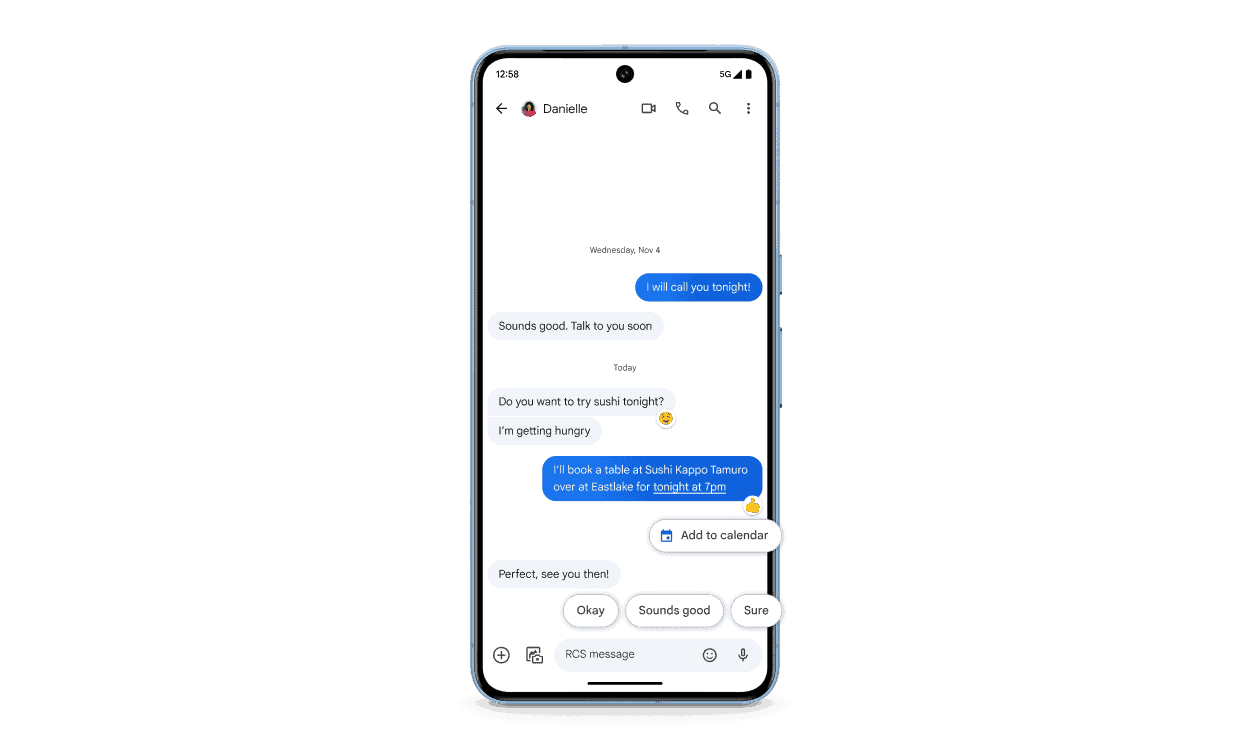
RCS Chat stands for Rich Communication Services, a modern messaging standard designed to replace traditional SMS and MMS. It brings features similar to popular messaging apps (like WhatsApp or iMessage) directly into your phone’s default messaging app, without requiring a separate download.
In simple terms, RCS upgrades text messaging for the smartphone era.
A Brief History of RCS
SMS (Short Message Service) has existed since the 1990s. While reliable, it has major limitations:
- 160-character limits
- No read receipts
- No typing indicators
- Poor image and video quality
To address this, the GSMA (Global System for Mobile Communications Association) introduced RCS as a next-generation messaging protocol. Google has been a major driver of RCS adoption, especially on Android devices.
Key Features of RCS Chat
RCS brings modern chat features directly into your messaging app:
✅ Rich Media Sharing
Send high-resolution photos, videos, GIFs, and audio messages without heavy compression.
✅ Read Receipts & Typing Indicators
See when someone has read your message or is typing a response.
✅ Group Chats
Create and manage group conversations with proper controls, naming, and participant visibility.
✅ Larger Message Limits
Send longer messages without splitting them into multiple texts.
✅ Chat Over Wi‑Fi or Mobile Data
Messages are sent using the internet instead of cellular SMS infrastructure.
✅ Business Messaging
Businesses can send verified messages with branding, quick-reply buttons, maps, and call-to-action links.
How RCS Works
Unlike SMS, which relies on cellular signaling, RCS uses IP-based messaging (similar to internet chat apps). Messages are delivered through:
- Mobile data
- Wi‑Fi networks
If the recipient doesn’t support RCS, the message automatically falls back to SMS or MMS.
RCS vs SMS vs iMessage
| Feature | SMS | RCS | iMessage |
|---|---|---|---|
| Internet-based | ❌ | ✅ | ✅ |
| Read receipts | ❌ | ✅ | ✅ |
| Typing indicators | ❌ | ✅ | ✅ |
| High-quality media | ❌ | ✅ | ✅ |
| Cross-platform | ✅ | ✅ (mostly Android) | ❌ (Apple-only) |
Is RCS Secure?
RCS supports end-to-end encryption, but availability depends on the messaging app and conversation type.
For example:
- Google Messages offers end-to-end encryption for one-on-one chats
- Group chats and business messages may not always be encrypted
Security continues to improve as adoption grows.
Which Devices Support RCS?
- Android devices: Widely supported through Google Messages
- Carriers: Most major carriers globally support RCS
- iPhone: Apple announced support for RCS starting with iOS 18, improving Android–iPhone messaging compatibility
RCS for Businesses
RCS Business Messaging allows companies to:
- Send branded messages with logos and colors
- Include buttons for purchases, tracking, or support
- Share rich content like product carousels
This makes RCS a powerful alternative to SMS marketing.
Advantages of RCS Chat
✅ No extra app required
✅ Modern chat features
✅ Works across carriers
✅ Better user experience than SMS
✅ Ideal for personal and business messaging
Limitations of RCS
❌ Requires internet access
❌ Not all devices or regions fully support it yet
❌ Encryption is not universal
❌ Depends on carrier and app implementation
The Future of RCS
As carriers, Google, and Apple continue expanding support, RCS is positioned to become the global standard for text messaging, bridging the gap between traditional SMS and app-based chat platforms.
Final Thoughts
RCS Chat modernizes texting by combining the simplicity of SMS with the rich features users expect today. While it’s still evolving, RCS represents a major step forward in making messaging faster, smarter, and more interactive—without needing yet another app.
If you’re using an Android phone, chances are you’re already using RCS without realizing it.