Android face recognition lets you unlock your phone just by looking at it. This handy feature uses your unique facial features as a security key, making it quick and easy to access your device without typing passwords. Android face recognition is a biometric technology that uses the front camera to scan and authenticate your face, offering a secure and convenient way to protect your personal information.
Setting up face recognition on Android is simple. Most modern Android phones include this feature in their security settings. Once activated, your phone creates a digital map of your face that it uses for future comparisons. The system works in different lighting conditions and can even adapt as your appearance changes slightly over time.
Android Face Recognition: 2026 Guide
Face recognition on Android has evolved significantly over the past few years. What started as a convenience feature is now a core part of smartphone security, app authentication, and digital payments. In 2026, Android face unlock ranges from basic camera-based systems to advanced 3D facial mapping powered by AI and dedicated hardware.
This guide explains how Android face recognition works, how secure it is, how to set it up, and what to do if it stops working.
What Is Android Face Recognition?
Android face recognition (commonly called Face Unlock) allows you to unlock your phone, approve payments, and sign in to apps using your face instead of a PIN, password, or fingerprint.
Depending on the device, face recognition uses:
- 📷 Front-facing camera (2D recognition)
- 🔦 Infrared sensors
- 📡 Depth sensors (3D mapping)
- 🤖 On-device AI processing
Not all Android face unlock systems are equally secure — the technology varies by manufacturer.
Types of Android Face Recognition (2026)
1. 2D Camera-Based Face Unlock
This uses only the front camera to match your face to a stored image.
✅ Fast and convenient
❌ Less secure
❌ May be fooled by photos (on older devices)
Common on budget and mid-range phones.
2. AI-Enhanced 2D Recognition
Modern 2D systems use machine learning to analyze:
- Facial contours
- Skin texture
- Blink detection
- Depth estimation via software
✅ More secure than basic 2D
✅ Faster recognition
❌ Still not as secure as true 3D systems
3. 3D Face Recognition (Infrared + Depth Mapping)
Premium Android devices use dedicated hardware to create a 3D map of your face.
✅ Highly secure
✅ Works in low light
✅ Suitable for payments and banking apps
✅ Hard to spoof
This is comparable to advanced facial recognition systems used in high-end smartphones.
How Secure Is Android Face Recognition?
Security depends on the hardware.
| Type | Security Level | Suitable for Payments? |
|---|---|---|
| Basic 2D | Low–Moderate | Sometimes restricted |
| AI 2D | Moderate | Often allowed |
| 3D Depth-Based | High | Yes |
Android classifies biometric security into tiers:
- Class 3 (Strong) – High-security biometrics (recommended for banking & payments)
- Class 2 (Weak) – Basic facial recognition
- Class 1 (Convenience) – Limited security use
You can check your device’s biometric classification in security settings (on supported models).
How to Set Up Face Recognition on Android (2026)
Steps may vary slightly depending on manufacturer, but generally:
- Open Settings
- Tap Security & Privacy
- Select Device Unlock
- Tap Face Unlock
- Enter your PIN/password
- Follow the on-screen instructions
- Position your face within the frame
- Complete the scan
Tips for Best Setup:
- Use good lighting
- Remove hats or sunglasses
- Hold the phone at eye level
- Maintain a neutral expression
Where You Can Use Face Unlock
In 2026, Android face recognition supports:
- ✅ Unlocking your phone
- ✅ Approving Google Wallet payments (on supported devices)
- ✅ Logging into banking apps
- ✅ Accessing password managers
- ✅ Secure folder access
- ✅ App authentication
Some apps may still require fingerprint or PIN depending on security policies.
Face Recognition vs Fingerprint: Which Is Better?
Face Recognition Pros:
- Hands-free
- Fast access
- Convenient for frequent unlocks
Face Recognition Cons:
- May struggle in extreme lighting (on 2D systems)
- Can be less secure than fingerprint (on basic models)
Fingerprint Pros:
- Highly secure
- Works in darkness
- More universally supported
Fingerprint Cons:
- Requires physical contact
- May fail with wet or dirty fingers
Many users enable both for maximum flexibility.
Improving Face Unlock Accuracy
If face recognition fails frequently:
✅ Re-register your face
Delete the current scan and set it up again in better lighting.
✅ Add an alternate appearance
Some phones allow a second scan for:
- Glasses
- Beard growth
- Hairstyle changes
✅ Clean the camera
Smudges can reduce accuracy.
✅ Update your software
Security patches often improve biometric performance.
Common Face Unlock Problems (And Fixes)
Problem: Face unlock not working in the dark
Solution: Increase screen brightness or enable “Brighten screen in low light” (if available).
Problem: Slow recognition
Solution: Restart the device or remove unnecessary background apps.
Problem: Face unlock disabled for banking apps
Solution: Your device may not meet high biometric security standards. Use fingerprint or PIN instead.
Privacy and Data Protection
Android stores facial recognition data:
- Encrypted
- Locally on the device
- Inside a secure hardware module (on supported devices)
- Not uploaded to Google servers
You can remove your face data anytime by going to:
Settings > Security > Face Unlock > Remove Face Data
Is Android Face Recognition Safe in 2026?
On modern devices with 3D depth mapping and strong biometric classification, face recognition is considered secure for everyday use, including mobile payments.
However:
- Budget devices may only offer convenience-level security.
- High-risk users (corporate, government, sensitive data handling) may prefer fingerprint + PIN.
For most users, Android face unlock provides a solid balance between security and convenience.
Final Thoughts
Android face recognition in 2026 is faster, smarter, and more secure than ever. While not all implementations are equal, premium Android devices now offer strong biometric protection that rivals other platforms.
If convenience matters to you, face unlock is a powerful feature. For maximum security, combine it with fingerprint authentication and a strong PIN.
As biometric technology continues to improve, face recognition is becoming less of a novelty — and more of a standard.
Key Takeaways
- Face recognition on Android requires at least 480×360 pixel images for accurate detection and authentication of facial features.
- Android 10 and newer versions offer enhanced face authentication support with improved security features.
- Most Android devices allow face recognition setup through the Security and Biometrics section in your phone’s settings.
Understanding Android Face Recognition
Android face recognition technology has evolved significantly, offering both convenience and security features for users. This technology works by analyzing facial features and has different implementations across Android devices.
Fundamentals of Face Recognition Technology
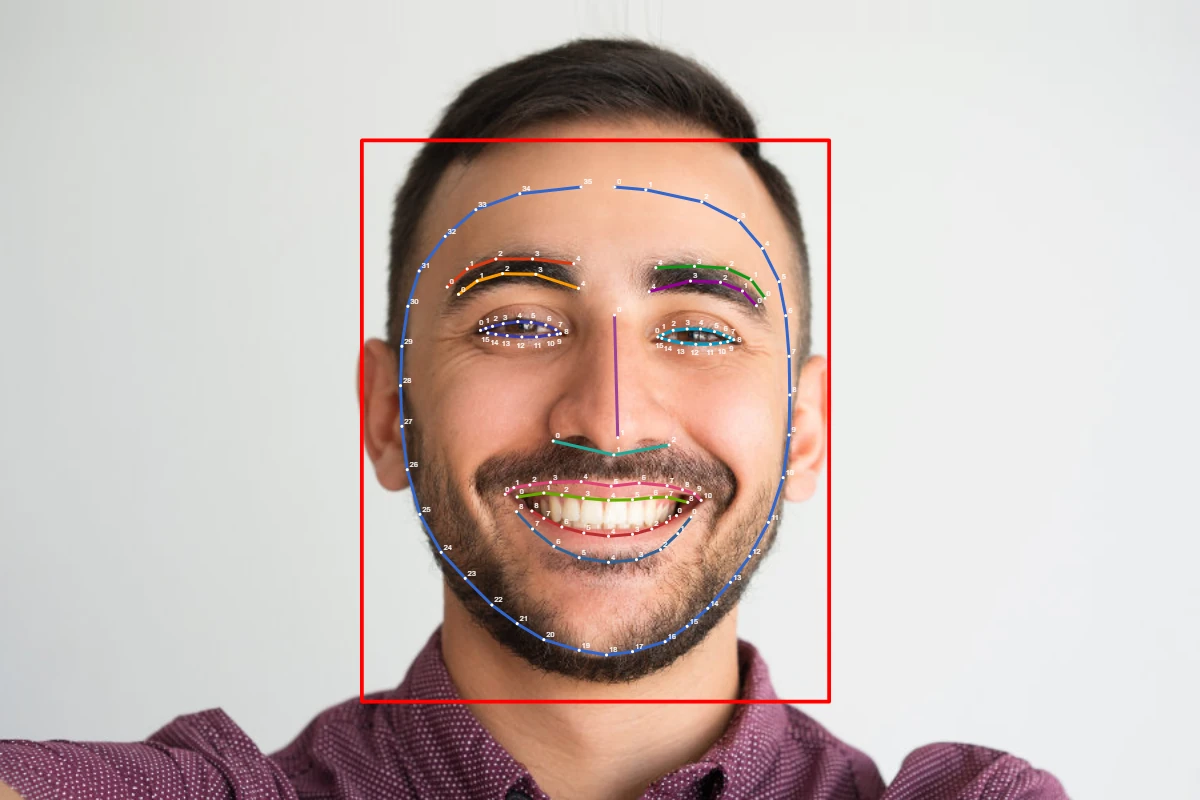
Face recognition on Android uses complex algorithms to identify unique facial features. The system captures an image of your face and creates a digital map of your distinct facial characteristics.
The process begins when the front camera scans your face. It measures dozens of points across your features and creates a mathematical model. This model becomes your facial “fingerprint” in the system.
Modern Android devices use multiple sensors for better accuracy. Some premium phones include infrared cameras and depth sensors to work even in low light. For good results, face images should be at least 480×360 pixels.
Android 10 and newer versions have improved face authentication features built into the operating system. The MediaPipe Face Detector can identify faces in both still images and moving video.
Difference Between Facial Recognition and Face Unlock
Face Unlock is a specific feature that lets you open your phone by looking at it. It’s mainly for convenience and works like a digital key. Samsung’s Face recognition feature is a common example that lets users quickly access their device.
Facial Recognition is broader technology that can:
- Identify people in photos
- Track attendance
- Verify identity in banking apps
- Personalize device experiences
The main differences are in security levels. Basic face unlock might be fooled by photos or videos. Advanced facial recognition uses liveness detection to verify you’re physically present.
Most Android phones store facial data securely on the device, not in the cloud. This approach protects your privacy while still offering the convenience of quick access to your phone.
Android Face Recognition Implementation
Implementing face recognition in Android apps requires specific technical considerations to ensure system compatibility and reliable performance. These implementations involve understanding how to integrate with the Android ecosystem and manage recognition accuracy.
Integration with Operating System
Android offers several ways to implement face recognition in apps. Developers can use Google’s ML Kit, which provides a ready-to-use API for face detection. This simplifies the process of identifying facial features in images or video streams.
For more advanced implementations, the Android Face Authentication HIDL provides secure processing of camera frames. This system preserves user privacy while enabling authentication features.
Custom implementations are also possible. Developers can create user face models from captured images and store them as part of user data. Libraries like TensorFlow Lite help in creating lightweight models suitable for mobile devices.
Face Capacity and Recognition Resolution
The capacity and resolution of face recognition systems determine their accuracy and performance. Most Android face recognition systems can handle multiple faces in a single frame, with ML Kit capable of detecting up to 10 faces simultaneously.
Recognition resolution refers to the detail level at which facial features are analyzed. Higher resolution improves accuracy but requires more processing power. On-device face recognition solutions like FaceNet balance accuracy and performance by using optimized neural networks.
The quality of facial recognition depends on:
- Camera resolution
- Lighting conditions
- Face angle
- Processing capabilities
Android apps like those using Mobile FaceNet offer real-time recognition with good accuracy while maintaining efficiency. This makes them suitable for everyday applications without draining device resources.
Key Features and Technical Specifications
Android face recognition systems combine advanced hardware capabilities with sophisticated software algorithms to provide secure and efficient biometric authentication. These systems balance performance, security, and user experience through various technical components working together.
Real-Time Processing and RAM Usage
Face recognition on Android devices requires significant processing power to work quickly and accurately. Most modern systems need at least 4GB of RAM to function smoothly, with premium devices often featuring 6-8GB for better performance.
The processing typically happens in dedicated neural processing units (NPUs) that handle biometric calculations without draining the main processor. This specialized hardware can process facial data in under 500 milliseconds on current flagship devices.
RAM usage varies based on the complexity of the authentication algorithm. Basic systems might use 150-200MB of RAM during the recognition process, while more advanced systems with liveness detection can use up to 500MB temporarily.
Device manufacturers optimize these systems by:
- Caching facial data in secure memory zones
- Using progressive scanning techniques
- Implementing adaptive resolution processing
Communication Protocols Support
Android face recognition systems rely on several communication protocols to transmit data securely between hardware components and software layers. The primary protocols include:
Internal Hardware Communication:
- I²C (Inter-Integrated Circuit) – connects low-speed sensors
- SPI (Serial Peripheral Interface) – links the camera module to processors
- MIPI (Mobile Industry Processor Interface) – transmits high-speed camera data
Network Protocols:
- TCP/IP – used when facial data needs cloud verification
- TLS/SSL – encrypts all biometric data during transmission
For device-to-device authentication, Android uses Bluetooth LE with encryption for secure facial template sharing. RS232 and RS485 protocols may be used in enterprise systems where Android devices connect to legacy access control systems.
The Android Biometric HAL (Hardware Abstraction Layer) standardizes how these protocols interact with the authentication framework, ensuring consistent security regardless of hardware differences.
Support for NFC and Other Secure Elements
Face recognition apps often work with NFC technology and secure elements to create multi-factor authentication solutions. NFC enables contactless verification when combined with facial recognition.
Android’s secure elements store facial templates in isolated hardware that’s resistant to tampering. This isolated environment, called the Trusted Execution Environment (TEE), prevents unauthorized access to biometric data.
Key secure elements include:
- eSE (embedded Secure Element)
- SE in SIM (SIM-based Secure Element)
- TPM (Trusted Platform Module)
Use cases combining face recognition with secure elements:
| Application | Authentication Factors |
|---|---|
| Banking apps | Face + NFC payment card |
| Door access | Face + NFC badge |
| Device unlock | Face + secure element verification |
The Biometric API in Android 10 and later provides standardized interfaces for developers to integrate face recognition with these secure technologies. This creates a consistent user experience across different hardware implementations.
Security Aspects of Android Face Recognition
Android face recognition systems balance convenience with security, requiring careful implementation to protect user data. Modern systems include anti-spoofing measures and secure processing frameworks to prevent unauthorized access.
Protecting Against Bypass and Unauthorized Access
Face recognition on Android devices needs a PIN, Pattern, or Password as a backup method. This creates a two-layer protection system in case face recognition fails or is compromised.
Many Android phones now include “liveness detection” to check if a real person is present. This helps block attempts to fool the system with photos or videos of the user.
Some hackers try to bypass face recognition through USB connections. Modern Android implementations isolate face data in secure areas of the processor to prevent this type of attack.
Wi-Fi vulnerabilities could potentially expose face data during transmission. Android 10 and newer versions address this by adding a secure processing system that handles camera frames with privacy protection built in.
Enhancements in OEM Security Measures
Phone manufacturers (OEMs) must meet specific security requirements in the Android Compatibility Definition Document. These rules ensure basic security standards across all Android devices.
Leading manufacturers have added extra protective features:
- Infrared sensors – Work in low light and detect depth
- Attention awareness – Checks if your eyes are open and looking at the screen
- Encrypted storage – Face data stays in a secure chip, never in the cloud
Samsung and Google have developed specialized hardware for better security. These chips process biometric data separately from the main system.
The facial recognition software on newer Android phones also runs regular checks to spot any tampering attempts. This active monitoring helps block unknown access methods.
Recovery and Reset Options
When face recognition fails on Android, users have several ways to regain access to their devices. These methods range from remote options that preserve data to last-resort solutions that erase everything.
Using Google Find My Device for Remote Reset
Google offers a helpful tool called Find My Device that lets you unlock your phone remotely. This service works when your phone is connected to the internet and linked to your Google account.
To use Find My Device:
- Visit the Find My Device website on another device
- Sign in with the same Google account used on your locked phone
- Select your locked device
- Choose “Erase Device” to reset your phone
Your phone will receive a notification about this action. After confirming, the reset process begins. This method is useful when you’re unable to access your device due to face recognition issues but need to protect your data from unauthorized access. Find My Device also uses GPS tracking to locate your phone if it’s lost.
Factory Reset and Data Protection
If remote options don’t work, a factory reset might be your only choice. This process erases all data on your device and returns it to its original state.
To perform a factory reset when locked out:
- Power off your device
- Press and hold specific button combinations (varies by model)
- Select “Recovery Mode” or “Factory Reset”
Some Android phones let you boot into Safe Mode by holding the power button and selecting the safe mode option. This might help if the face recognition problem is caused by an app.
Before trying any reset, remember that a factory reset is a permanent action. All apps, photos, and personal data will be erased unless previously backed up. Many experts note that factory reset is the only option when other unlock methods fail.
Incorporating Face Recognition in Various Environments
Face recognition technology performs differently based on where it’s used. The environment affects accuracy and reliability, making it important to understand how these systems work across different settings.
Indoor vs. Outdoor Use Cases
Indoor Environments generally offer better conditions for face recognition technology. Controlled lighting and stable backgrounds help Android face recognition apps work more consistently.
Indoor spaces like offices or homes have:
- Consistent lighting conditions
- Controlled temperatures
- Stable backgrounds
- Fewer variables to process
Outdoor Settings present more challenges. Sunlight, shadows, and weather can affect how well an app detects faces. Developers must adapt their Android apps to handle these changing conditions.
Challenges to solve include:
- Varying light levels throughout the day
- Shadows that obscure facial features
- Rain or snow interference
- Moving backgrounds that confuse detection algorithms
Apps need stronger face detection capabilities when used outdoors. Some Android devices now include special hardware to improve outdoor recognition accuracy.
Healthcare Applications in Hospitals
Hospitals use face recognition for security and patient care. The technology helps identify staff, patients, and visitors in sensitive areas.
Patient Identification prevents medical errors. Face recognition confirms patient identity before procedures or medication administration. This is especially helpful with unconscious patients or those who cannot communicate.
Staff Access Control restricts entry to sensitive areas. Only authorized personnel can enter medication rooms or operating theaters when face authentication systems verify their identity.
Hygiene Benefits make face recognition valuable in hospitals. Touch-free access reduces contamination risks in sterile environments. Staff don’t need to handle ID cards or touch keypads.
Android-based hospital systems often use specialized face recognition tools that work with medical masks and protective equipment. These systems must follow strict privacy rules while maintaining high accuracy levels.
Customization and Manufacturer Support
Android face recognition features vary widely across device manufacturers, with each company offering different levels of customization and support options to meet user needs.
Customized Support from ODM and OEM
Phone manufacturers (OEMs) and original design manufacturers (ODMs) implement face recognition differently across Android devices. Samsung offers its own face authentication system with unique features like improved low-light detection. Google Pixel phones use specialized hardware for more secure face unlock.
Chinese manufacturers like Xiaomi, OPPO, and Huawei have developed custom face recognition solutions that often include:
- Infrared sensors for better performance in dark environments
- 3D depth mapping for increased security
- Animation effects during face scanning
- Customizable unlock speeds
Many OEMs allow users to adjust security settings, choosing between faster recognition or more secure options. Some manufacturers let apps use face recognition for payment verification, while others limit this feature for security reasons.
Technical and After-Sales Support
When users face problems with face recognition, manufacturers provide various support channels. Most OEMs offer troubleshooting guides specifically for biometric issues on their support websites.
Customer service teams are trained to help with:
- Face recognition setup problems
- Scanning failures in different lighting conditions
- Software update issues affecting face unlock
For developers, Android provides biometric authentication frameworks that can be implemented in apps. Google’s documentation includes ML Kit face detection tools that help developers create custom solutions.
Many companies run specialized support centers in China where much of the face recognition hardware is developed. These centers provide firmware updates and hardware repairs if sensors malfunction.
Frequently Asked Questions
Android face recognition systems offer helpful ways to unlock devices and verify identity. These systems have specific setup requirements, troubleshooting steps, and security considerations that users should understand.
What steps are needed to troubleshoot face recognition issues on Android devices?
When face recognition isn’t working properly on your Android device, try these simple fixes. First, make sure your face is well-lit when attempting to unlock the device.
Clean your front camera lens, as smudges can interfere with recognition accuracy. Dirt or fingerprints often cause recognition failures.
Try re-registering your face in different lighting conditions. Go to Settings > Security or Biometrics and security and look for Face recognition or Face unlock options.
If you wear glasses, try registering your face both with and without them. Some Android devices may ask you to remove glasses during setup, which can cause problems later.
Updating your device software may also fix recognition bugs. System updates often include improvements to biometric features.
Where can one find open-source Android face recognition libraries or repositories?
Several open-source libraries make face recognition implementation easier for Android developers. Google’s ML Kit offers a face detection API that works on-device or in the cloud.
OpenCV for Android provides comprehensive facial recognition capabilities with regular community updates. This library includes various algorithms for face detection and recognition.
TensorFlow Lite has pre-trained models that developers can implement in Android apps. These models balance accuracy with performance considerations.
GitHub hosts numerous repositories with sample projects demonstrating facial recognition implementation. These often include step-by-step tutorials and code examples.
Which is considered the best android application for face recognition?
Samsung’s built-in face recognition technology is widely regarded as reliable on Galaxy devices. It allows users to unlock their devices and verify identity for services like Samsung Pay.
Google’s Face Unlock on Pixel phones offers strong performance with frequent updates. Its integration with Android provides seamless functionality.
Third-party apps like FaceApp and Snapchat use advanced face recognition for different purposes than security. These apps focus on filters and effects rather than authentication.
Enterprise solutions like Swiftlane offer more robust security features. They use anti-spoofing technology with 2D and 3D facial data to prevent fraud attempts.
How can developers implement real-time face recognition in Android apps?
Developers can use Google’s ML Kit Face Detection API for straightforward implementation. This API works in real-time and offers on-device processing for privacy.
The Camera2 API or CameraX should be used alongside ML Kit for capturing frames. These APIs provide efficient frame processing essential for real-time applications.
Processing should happen in background threads to maintain UI responsiveness. Using AsyncTask or Kotlin Coroutines helps prevent app freezing during recognition.
Face tracking rather than constant detection improves performance. By tracking faces between frames, apps can reduce processing requirements significantly.
What are the vulnerabilities of Android’s face recognition technology with respect to photographs?
Basic Android face recognition systems can sometimes be fooled by high-quality photographs. Older or budget devices often lack sophisticated liveness detection.
More advanced systems use anti-spoofing technology to detect attempts to use photos or videos. These systems look for natural movements and depth information.
Some manufacturers add infrared sensors to detect three-dimensional faces. This technology helps distinguish between flat images and actual human faces.
Users should enable additional security methods alongside face recognition. Combining face recognition with a PIN or pattern adds an extra layer of security.
How do Android devices integrate facial recognition for secure authentication?
Android devices store facial data locally in secure areas of the phone. This information never leaves the device, protecting user privacy.
The Biometric API allows apps to request facial authentication similarly to fingerprints. Developers can implement this without accessing the actual facial data.
Users can manage face recognition through their device’s security settings. This allows them to delete or recreate facial profiles as needed.
Samsung Galaxy devices integrate face recognition with various apps and services. Users can authenticate payments and access secure folders using their face.
Android’s security measures prevent facial data from being accessible to malicious apps. The system architecture isolates biometric information from other software.