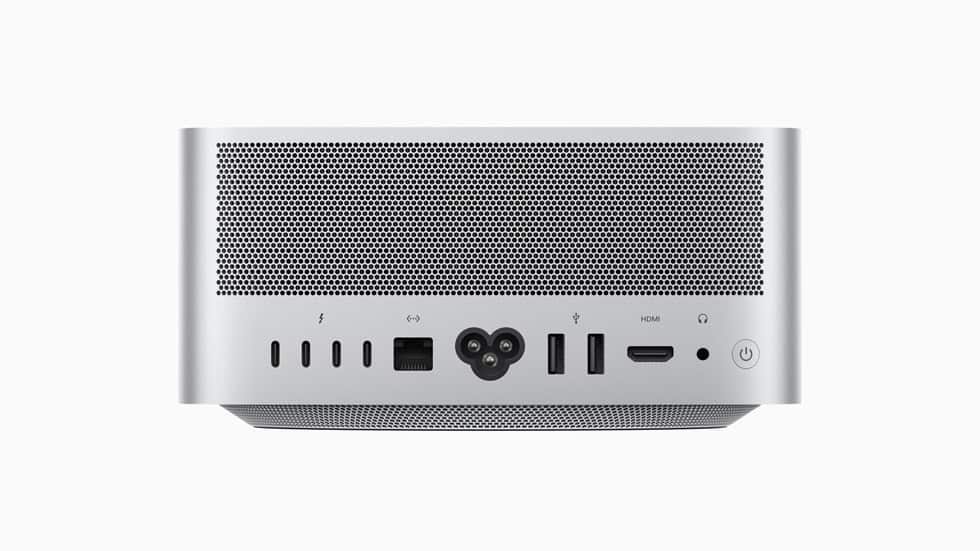
The Apple Mac Studio is a testament to the company’s commitment to high performance and advanced connectivity. Equipped with a variety of ports, the Mac Studio caters to professionals in need of a powerful hub for creative tasks. Its design showcases the brand’s famed attention to detail, integrating a CPU and GPU that push the boundaries of desktop computing.
This machine stands out for its numerous ports which fulfill the demands of modern workflows. Four Thunderbolt 4 ports offer rapid data transfer and extensive peripheral connectivity, while USB-A ports ensure compatibility with a wide range of devices. Mac Studio further includes an HDMI port, enabling connection to a variety of displays.
The Mac Studio’s ports boost its ability to serve as a cornerstone of a professional setup. They allow users to connect multiple devices simultaneously, enhancing both multitasking and the capability of the system. Its comprehensive connectivity options are vital for maintaining efficient and productive work environments.
Mac Studio Ports: Connectivity Options
The Mac Studio is designed to be a powerful, compact desktop with extensive connectivity options, catering especially to professionals and creatives who require multiple peripherals and high-speed data transfer.
Overview of Mac Studio Ports
Front Ports
- 2 x USB-C (Thunderbolt 5 or USB 3)
These two USB-C ports on the front are perfect for connecting external storage devices, charging accessories like iPads, keyboards, mice, or trackpads, and quick plug-and-play peripherals.
Rear Ports
- 6 x Thunderbolt 5 (USB-C)
The Mac Studio features six Thunderbolt 5 ports in total, which provide ultra-fast data transfer, support for multiple high-resolution external displays, and compatibility with a wide range of Thunderbolt and USB-C devices. - 1 x HDMI Port
For connecting an external monitor, projector, or HDTV, the HDMI port offers an easy way to add a display without needing adapters. - Other Ports (Model Dependent)
Depending on the Mac Studio model (M1, M2, M3, or M4 chip variants), additional ports might include:- 10Gb Ethernet for high-speed wired networking
- 3.5mm headphone jack
- SD card reader (on some models)
Connectivity Use Cases
- External Displays
Use the Thunderbolt 5 ports or HDMI port to connect multiple 4K or even 8K monitors, ideal for video editing, 3D design, or software development workflows. - External Storage
Connect fast external SSDs or RAID arrays via Thunderbolt 5 or USB-C ports for large file transfers and backups. - Charging and Accessories
Front USB-C ports allow charging of devices like iPads or wireless peripherals without needing to reach the back. - Networking
The 10Gb Ethernet port ensures stable, high-speed internet or local network connections for data-intensive tasks.
Summary
The Mac Studio’s rich port selection — including six Thunderbolt 5 ports, USB-C front ports, HDMI, and Ethernet — provides versatile, high-performance connectivity for users needing a powerful, flexible desktop setup.
For more detailed setup tips and model-specific port info, you can check Apple’s official guide: Take a tour of Mac Studio – Apple Support.
If you want a video overview of the connectivity options, this YouTube guide is helpful: Mac Studio Connectivity – YouTube.
Key Takeaways
- Mac Studio offers diverse ports for enhanced connectivity
- Integrates powerful CPU and GPU for advanced computing
- Designed to be a versatile hub for professional use
Mac Studio Ports and Connectivity
The Mac Studio offers a versatile range of ports and connectivity options to support high-speed transfers, network connections, and multimedia setups.
USB-C and Thunderbolt 4 Ports
Mac Studio features several Thunderbolt 4 ports which support fast data transfer speeds up to 40Gb/s. They can connect to both USB-C and Thunderbolt devices, including external storage and monitors. These ports are also compatible with USB 4 for a wide range of uses.
Ethernet and Network Interfaces
For wired connections, there is an option for a 10Gb Ethernet port. This port enables quick and stable network access, essential for transferring large files or streaming high-resolution video. Mac Studio also supports the latest Wi-Fi 6E technology for reliable wireless networking.
Audio and Video Outputs
An HDMI port on the Mac Studio allows for easy connection to TVs and external displays. There is also a 3.5mm headphone jack for audio out, offering high-quality sound for headphones or speakers.
Additional Ports and Slots
Mac Studio includes USB-A ports, providing compatibility with a variety of devices like iPhones and external drives. There is an SDXC card slot as well, which caters especially to professionals who need to regularly import photos and videos from cameras.
Wireless and Bluetooth Connections
Bluetooth is an integral part of the Mac Studio, enabling easy pairing with a range of devices, from mice and keyboards to headphones. Wi-Fi 6E adds cutting-edge wireless connectivity, ensuring higher performance and improved network efficiency.
Design and Build Integration
Built with an aluminum chassis, Mac Studio is designed for both durability and sleek aesthetics. It maintains a compact size, a testament to Apple’s commitment to integrating powerful connectivity into a space-efficient form.
Performance and Capability
The Mac Studio reshapes the landscape of computing power and connectivity. It serves professionals who demand peak performance and expansive options.
Processor and GPU Power
The heart of Mac Studio’s performance lies in its choice of chip: the M1 Ultra or the M2 Max. The M1 Ultra with a 20-core CPU offers a blend of 16 performance cores and 4 efficiency cores. It impresses with multi-core tasks. The GPU options peak at a 48-core version, delivering smooth graphics handling for intensive tasks.
Memory and Storage Options
Unified memory configurations start at 64GB and can expand to 128GB, ensuring rapid data access. Storage begins at 1TB SSD and scales to a capacious 8TB. The system boasts a staggering 800GB/s memory bandwidth, which supports quick access and storage of large files.
Support for Professional Workflows
Professionals will find support for various codecs including ProRes and HEVC. Hardware-accelerated video encode and decode engines streamline workflow. The 32-core Neural Engine excels in machine learning tasks. These capabilities make it ideal for advanced video and audio production needs.
Enhanced Connectivity Features
Mac Studio offers multiple Thunderbolt 4 ports that facilitate high-speed data transfers and connection to a range of peripherals. USB 3.1 Gen 2 is part of the mix, increasing versatility. These ports bolster the machine’s performance as a hub for professionals in various fields.