

iMacs have changed how we connect to the internet. The latest models come with different ways to get online. Some iMacs now have Ethernet ports built into their power bricks. This new design frees up space on the computer itself.
Ethernet gives users a fast and stable internet link. It’s great for people who need quick speeds for work or play. The port’s location on the power brick is smart. It keeps wires tidy and makes setup easy.
Not all iMacs are the same. Some models need extra parts to use Ethernet. Users can buy adapters that plug into other ports. These adapters let older iMacs use wired internet too.
Understanding Your iMac’s Ethernet Port
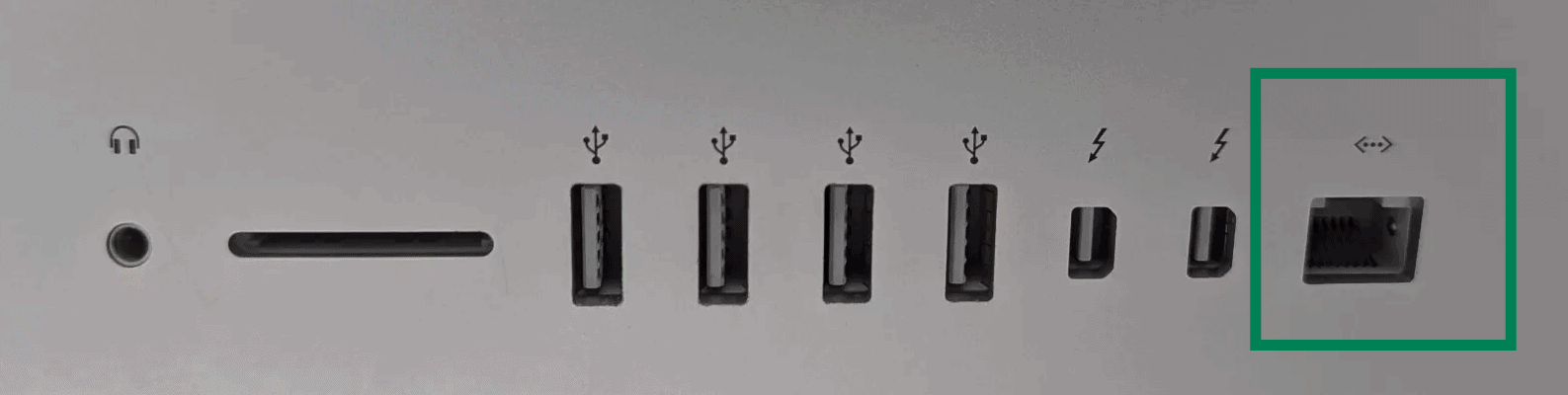
While Wi-Fi is incredibly convenient, sometimes a wired Ethernet connection is the way to go. It offers greater stability, faster speeds, and lower latency – perfect for gaming, streaming, or large file transfers. Let’s explore the Ethernet port specifications on different iMac models and some troubleshooting tips if you encounter problems.
Ethernet Speeds Across iMac Generations
Not all iMacs have the same Ethernet capabilities. Here’s a breakdown of the Ethernet speeds supported by different iMac generations:
| iMac Generation | Ethernet Speed |
|---|---|
| iMac G3 – iMac G5 | 10/100 Mbps |
| Early Intel iMacs | 10/100/1000 Mbps (Gigabit Ethernet) |
| iMac (2009-2017) | 10/100/1000 Mbps (Gigabit Ethernet) |
| iMac (2017-2020) | 10/100/1000 Mbps (Gigabit Ethernet) |
| iMac (2021 and later) | 10/100/1000 Mbps (Gigabit Ethernet) – Some models offer 10 Gigabit Ethernet |
As you can see, most modern iMacs support Gigabit Ethernet, which offers speeds up to 1000 Mbps. However, some newer iMacs, particularly higher-end models, might offer even faster 10 Gigabit Ethernet for those who need the absolute best performance.
Troubleshooting Ethernet Problems
If you’re having trouble with your iMac’s Ethernet connection, here are some troubleshooting steps you can take:
1. Check the Cables
Make sure your Ethernet cable is securely plugged into both your iMac and your router or modem. Try a different Ethernet cable to rule out a faulty cable.
2. Restart Your Devices
Restart your iMac, router, and modem. This can often resolve temporary network glitches.
3. Check Network Settings
Go to System Settings (or System Preferences on older macOS versions) > Network. Make sure Ethernet is selected in the sidebar, and check that your network settings are configured correctly. You might need to contact your internet service provider for assistance with your network settings.
4. Run Network Diagnostics
macOS has a built-in network diagnostics tool that can help you identify and resolve network problems. To access it, go to System Settings (or System Preferences) > Network, then click on “Assist me” and choose “Diagnostics.”
5. Check for macOS Updates
Make sure your macOS is up to date. Software updates often include bug fixes and improvements that can resolve network issues.
6. Try a Different Port (if applicable)
If your iMac has multiple Ethernet ports, try connecting to a different port. This can help you determine if the problem is with a specific port.
7. Reset the SMC (System Management Controller)
The SMC controls various hardware functions on your iMac, including networking. Resetting the SMC can sometimes resolve Ethernet problems. The steps for resetting the SMC vary depending on your iMac model, so check Apple’s support website for instructions specific to your device.
Key Takeaways
- New iMacs may have Ethernet in the power brick
- Ethernet offers fast and stable internet
- Adapters can add Ethernet to iMacs without built-in ports
Understanding Ethernet Connectivity in iMacs
Ethernet is a key way for iMacs to connect to the internet. It offers fast and stable connections. iMacs have changed how they handle Ethernet over time.
The Role of Ethernet in Internet Access
Ethernet gives iMacs a direct link to the internet. It’s often faster than Wi-Fi. To use Ethernet you need a cable and a port. The cable plugs into your iMac and your router or modem. This creates a path for data to flow.
Ethernet is good for big file transfers and online gaming. It’s less likely to drop out than Wi-Fi. Many internet service providers (ISPs) suggest using Ethernet for the best speed.
iMac Ports Overview
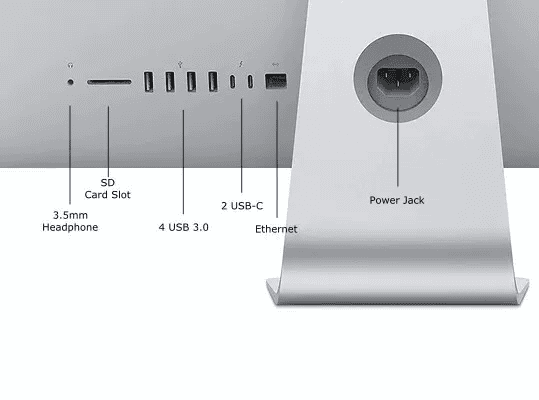
iMacs have changed their ports over the years. Newer models may not have a built-in Ethernet port. Instead they use USB-C or Thunderbolt ports. These ports can connect to Ethernet with an adapter.
Some recent iMacs have the Ethernet port in the power brick. This keeps the back of the iMac clean. Other ports on iMacs include USB-A USB-C and HDMI. These can all help connect devices or displays.
RJ-45 Connector and Physical Setup
The RJ-45 connector is the standard for Ethernet cables. It looks like a large phone jack. To set up Ethernet on an iMac:
- Plug one end of the cable into the iMac’s Ethernet port or adapter
- Plug the other end into your router or modem
- Your iMac should detect the connection
For iMacs with Ethernet in the power brick you’ll need to use that special cable. The system settings let you manage your Ethernet connection. You can set up things like IP address and DNS there.
Frequently Asked Questions
iMac users often have questions about Ethernet connectivity. Here are some common queries and answers about iMac Ethernet ports and options.
What is the Ethernet port speed on the latest iMac models?
The latest iMac models offer Gigabit Ethernet speeds. This means data can transfer at up to 1000 megabits per second. Gigabit Ethernet is fast enough for most home and office needs.
How can one connect to Ethernet on the 24-inch iMac?
The 24-inch iMac has a unique setup for Ethernet. The port is on the power adapter not the computer itself. Users plug an Ethernet cable into the power brick. This keeps the iMac slim while still offering wired internet.
Are there differences in Ethernet capabilities among various iMac generations?
Yes iMac Ethernet has changed over time. Older models had built-in ports. Newer ones may use adapters or power brick solutions. All recent iMacs support Gigabit Ethernet speeds.
Is an Ethernet power adapter necessary for connecting an iMac to a wired network?
For some iMacs yes. The 24-inch M1 iMac needs the special power adapter with Ethernet. Other models might work with USB or Thunderbolt adapters instead.
In the absence of a built-in Ethernet port, what are the options for enabling Ethernet on an iMac?
iMacs without built-in ports have choices. USB to Ethernet adapters work well. Thunderbolt to Ethernet adapters offer faster speeds. The power brick option is available for certain models.
How does one prioritize Ethernet over WiFi connections on an iMac?
To use Ethernet instead of WiFi go to System Preferences. Open the Network pane. Drag Ethernet to the top of the list. This tells the iMac to use Ethernet first when available.





